FDP FAQ
Why am I getting FDP_DISABLED errors when issuing FDP commands?
Many “FDP” NVMe Log Pages and Features require Flexible Data Placement to be enabled prior to issuing the command. If Flexible Data Placement is disabled and a command to retrieve an FDP Log Page or Feature is issued, this will result in the command failing with status code FDP_DISABLED.
Flexible Data Placement can be enabled using our Python API:
from fdp_dut import get_dut
target = 100  # Slot Number
endgid = 1  # Specify the Endurance Group to enable FDP in
dut = get_dut(target)
dut.fdp.enable_fdp(dut, endgid=endgid)
See FDP for more information regarding FDP Python utilities.
How do I issue I/O using Flexible Data Placement?
There are two ways to issue I/O to a drive using Flexible Data Placement.
A convenient method is to use the VirtuaLUN GUI:
In the left-hand menu, select the device you wish to perform FDP I/O on
Navigate to the ‘Namespace X Tests’ tab in the top-hand menu
Configure the UseFDP knob as desired before starting an I/O test
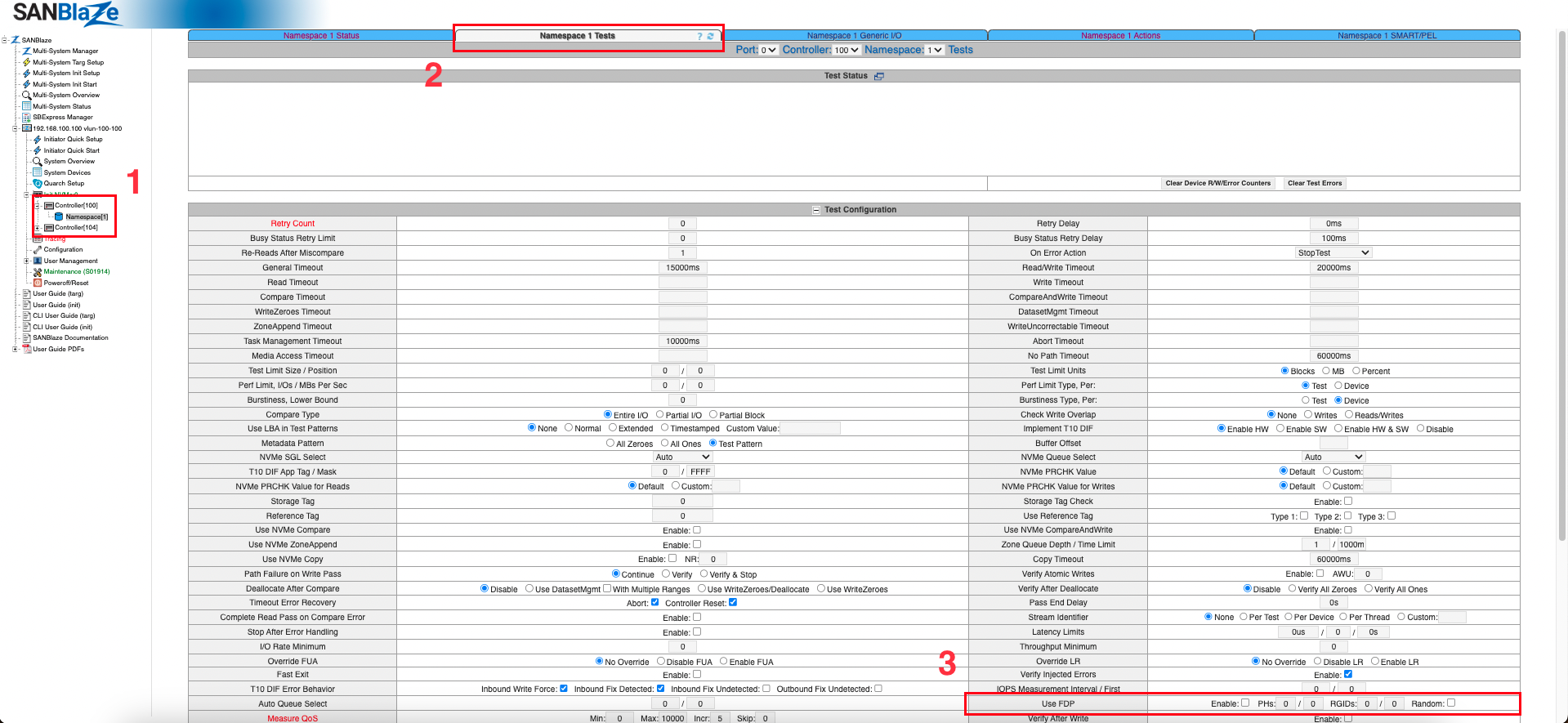
The GUI is used to control the UseFDP knob found in /iportX/port.
This knob has the format UseFDP=A,B,C,D,E, where:
A - is the Enable Flag, which is either 0, 1, or 2. If the value is 1, then Write commands are tagged with DTYPE=2 and DSPEC=P, where P is a Placement Identifier. If the value is 2, then for each thread, choose a new Placement Identifier randomly, according to the remaining parameters B,C,D,E.
B - is how many Placement Handles to use to tag Write commands. If the value is 0, the number of Placement Handles is taken from the number reported in NRUHSD, in the I/O Management Receive Reclaim Unit Handle Status data structure (if it is non-zero) or else the number reported in the NRUH field in the current FDP configuration returned by the Flexible Data Placement Configurations Log Page data structure (if it is non-zero). If all numbers are 0, then FDP will be disabled.
C - is the starting Placement Handle to use. To use the same handle N for all threads, set B = 1 and C = N. To use a range of handles X to Y, set B = Y - X + 1 and C = X.
D - is the number of Reclaim Group Identifiers to use. If D is 0, then the number of identifiers to use is taken from the number reproted in the NRG field in the current FDP configuration.
E - is the starting Reclaim Group Identifier to use. To use the same identifier N for all threads, set D = 1 and E = N. To use a range of identifiers X to Y, set D = Y - X + 1 and E = X.
Before performing an I/O test, write the desired configuration to /iportX/port by issuing the following command:
sbecho UseFDP=A,B,C,D,E > /iportX/port
where X represents the port (normally 0)
Why does FDP_LogPage_22h_Firmware_Update end with a warning?
This test verifies that the FDP Statistics Log Page (LID 22h) is not cleared by a firmware update, so it needs a firmware update to perform. It activates firmware that is already resident on the drive; it never downloads an image, and there is no configuration setting that points it at an image file.
Before running the test, download a second firmware image whose revision differs from the running one into another firmware slot. In the VirtuaLUN GUI, use the Download Firmware button on the device page and pick the image. The Commit Firmware slot list will then show the second image in an inactive slot.
At step 21 the test reads the Firmware Slot Information log page (LID 03h) and looks for a slot whose FRS value differs from the running revision. If every other slot is empty or holds the same revision, there is nothing for the Firmware Commit at step 26 to activate, so step 25 records a warning and ends the test. A missing second image is a setup prerequisite rather than a drive defect, so the test does not report Failed; it ends as a Warning, which keeps it visible in the W column of the report.